


Habitica: Gamify Your Tasks
4.73.92K Reviews
App Specs
- Version
- 4.10.4
- Updated On
- License
- Free
- Downloads
- 5,000,000+
- Developer
- HabitRPG, Inc.
- Categories
- Productivity
- Platform
- Android
Screenshots
 Analysis by AppCompare
I like productivity tools best when they make it easier to begin, not when they turn planning into another chore. Habitica takes a distinctive route: it wraps everyday tasks in role-playing game mechanics, so checking off a real-world responsibility can also move a character forward. That idea can be genuinely motivating, but it works best when you enjoy the game layer and keep your task list realistic.
As a free productivity app from HabitRPG, Inc., Habitica has built a substantial audience: it has more than five million installs and an average rating of 4.7 from around 72,000 ratings. It is rated for Everyone and has been available since December 10, 2015. Optional in-app purchases range from $0.99 to $47.99 per item, so you can try its basic approach without paying, while keeping in mind that extras are available.
What the game layer changes in daily planning
The useful difference is not simply that tasks have fantasy names. Habitica gives small actions a visible consequence inside the game, which can make an otherwise forgettable routine feel more rewarding. That can help when the hardest part of a task is getting started: a short walk, a quick tidy-up, or opening a book may feel more satisfying when it also advances your character.
I would treat that motivation as a nudge, not a cure for procrastination. If a task is too vague, too large, or not actually important to you, adding points and equipment will not make it magically manageable. The app is at its best when you turn intentions into specific actions you can recognize as complete.
Picking the right task type
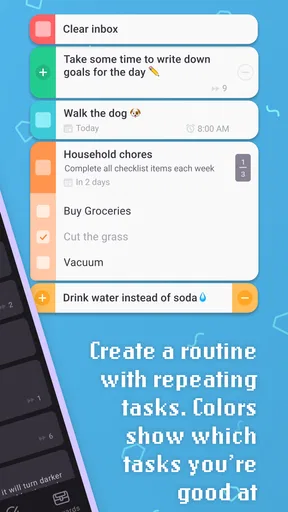
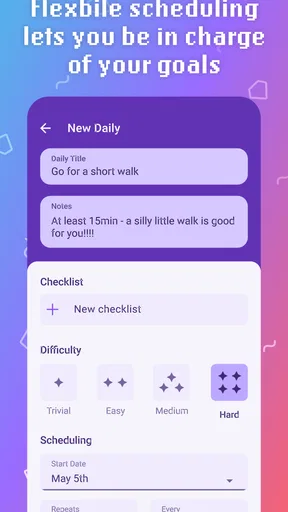
The three task categories call for slightly different thinking. Habits suit actions you want to encourage or discourage over time, while Dailies are for responsibilities that recur on a regular schedule. To-Dos are better for one-off jobs. Choosing carefully matters: putting an occasional errand among daily obligations can make your routine feel harsher than it needs to be, while treating a genuinely recurring commitment as a one-off makes it easier to lose sight of.
For a practical setup, I would start with a few tasks that already matter rather than importing every obligation at once. Make each entry concrete enough to check off without debate. “Prepare lunch for tomorrow” is easier to act on than “get organized,” and a small set of clear tasks makes it easier to see whether the game mechanics help you follow through.
Current strengths, with a social trade-off
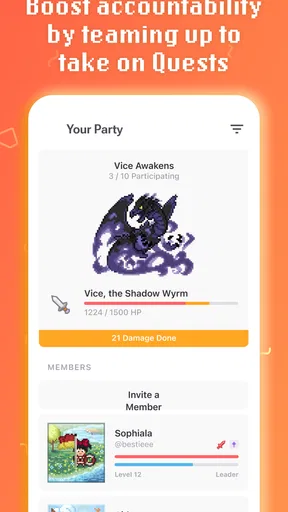
Party play and community challenges add accountability that a private checklist cannot offer in the same way. Working toward a shared goal may help if friendly encouragement gets you moving, and sharing small wins can make progress feel less solitary. But social motivation is personal: if you prefer to keep goals private, or dislike feeling answerable to a group, the collaborative side may add pressure rather than support.
Worth Reading Before You Choose

EA SPORTS FC Mobile 26 Is a Bigger Football Game, but It Takes Time

Flipboard Shows What News Apps Must Do Beyond the Feed

Switching to Android Auto Means Rethinking Your Driving Routine

Google Calendar Makes a Crowded Week Easier to Manage

Ludo King Makes the Most of the Minutes Between Plans

Baby Panda World Brings Quick Play to Modern Phones, but Its Game Library Feels Busy
I would join a party or challenge because its tone and goals suit me, not just because the option exists. A group can make a routine more engaging, but it cannot decide what deserves a place on your list. Keeping your own priorities clear helps the social layer remain a source of encouragement instead of another set of obligations.
What has stayed familiar, and what to expect
Habitica’s release history reaches back to 2015, and its core appeal remains easy to understand: organize real tasks, then connect completion to an RPG-style character and rewards. That long-running identity is a reason to consider it if the format sounds appealing, but a release date alone does not tell me which individual features have changed over time. I would focus on whether the current task structure and game loop fit your routine rather than assuming the app has evolved in a particular way.
For someone already using it, the main practical question is whether the system still makes daily planning easier. If you return after a break, reviewing old entries before restarting can help prevent an abandoned backlog from becoming a wall of overdue obligations. Keep what remains relevant, revise tasks that no longer reflect your life, and begin with a manageable routine rather than trying to repay every missed day at once.
Who is likely to enjoy it
Habitica is a strong fit for people who enjoy character progression, respond to visible rewards, or want a more playful alternative to a plain checklist. It may also suit friends who like to encourage one another around shared goals. I would be more cautious about recommending it to someone who finds game mechanics distracting, wants a highly minimal interface, or needs a tool centered on complex project planning rather than personal habits and tasks.
That distinction matters when comparing it with ordinary reminders and to-do apps. A conventional checklist is often faster when all you need is a place to capture appointments and errands. A calendar is usually clearer for time-specific commitments. Habitica offers a different trade: more game context and social motivation, in exchange for learning how its categories, rewards, and character progression fit together. It is not automatically a better organizer; it is a better match for a particular kind of motivation.
A routine that puts the system to work
Imagine you get home after work with a few things competing for attention: prepare dinner, take a short walk, and send an important message. In Habitica, you could use a recurring entry for the walk if it is part of a regular routine, and a one-off To-Do for the message. The categories help separate repeatable behavior from a single obligation, while the game reward gives you a small reason to start. The key is not to turn every minute into a quest; it is to make a few useful actions easier to notice and finish.
One practical tip is to review your list at a calm moment rather than adding tasks only when you are already overwhelmed. That gives you a chance to remove stale entries and decide which actions are realistic for the day. Another is to make the reward system serve your priorities: if you find yourself adding trivial tasks just to collect rewards, simplify the list and keep the focus on actions that matter outside the app.
There is also a meaningful difference between personal accountability and shared accountability. A party can make a goal feel more engaging, but it is sensible to begin with tasks you are comfortable sharing and to choose challenges that match your actual capacity. If group expectations start making a hobby or self-care routine feel like a performance, stepping back to a private list may be the healthier choice.
Where the friction shows up
The same game layer that makes Habitica memorable can also make it feel busy. New users have to understand the task categories and how completing or missing tasks affects their character. If you only want a quick capture box, this may feel like extra setup before the app becomes useful. I would give myself time to learn the structure, but I would not force the system if I kept avoiding it.
Another trade-off is that in-game consequences can feel motivating to one person and discouraging to another. Missing a task is sometimes a reflection of an unrealistic plan, an unexpected interruption, or a difficult day—not a lack of effort. If character damage makes you feel guilty rather than focused, adjust your task load or choose a simpler tool. A productivity system should help you recover and continue, not turn normal setbacks into a reason to quit.
Habitica is also not the first choice I would make for coordinating a complicated work project with dependencies, detailed timelines, or a large volume of shared assignments. Its appeal is personal routines and manageable tasks with a playful layer. I would use a dedicated project planner when the work needs structured ownership and scheduling, and keep Habitica for habits or everyday follow-through if the game mechanics still help.
Cost, access, and what to weigh next
You can start without paying, which makes it possible to test whether the RPG approach changes your behavior before deciding whether optional purchases are worthwhile. The listed purchase range runs from $0.99 to $47.99 per item, so I would check the in-app options carefully and spend only if an extra has clear value for you. The basic decision is not whether a paid item makes the system more motivating in theory, but whether the free experience already fits the way you plan.
The app is listed for Android with a minimum operating system requirement of 8.0. If you switch between phone and computer, the web version can be part of the routine too; the mobile and web experiences are intended to work together, which is useful when you want to review tasks at a desk and check them off on the go. I would still make the phone workflow comfortable before building a complicated system, since a task manager is only useful if it is easy to consult when the moment to act arrives.
For anyone wondering whether Habitica is suitable for younger users, its age rating is Everyone. That describes the content rating, while the more personal question is whether the game format and any social participation are appropriate for the individual using it. As with any shared online activity, I would make choices about groups and goals thoughtfully rather than assuming every community feature is right for every person.
What should you watch as you decide whether to stick with it? Notice whether you complete more meaningful tasks, whether the game layer makes you return to your list, and whether reviewing your entries feels manageable. If the rewards become the only reason you add tasks, or the routine creates more guilt than momentum, that is useful feedback. You can simplify your setup, focus on a smaller set of habits, or move back to a plain checklist without treating the experiment as a failure.
Turning Tasks into Quests
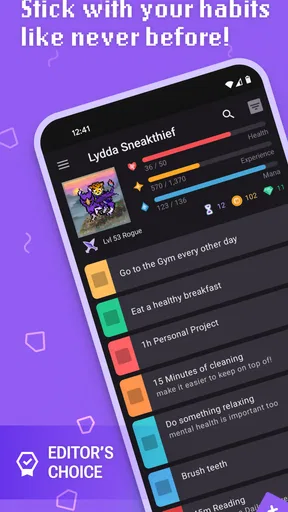
When I first downloaded Habitica, I was intrigued by its unique approach. Imagine turning your daily routine into a role-playing game (RPG). You create an avatar and start leveling up by completing real-life tasks. From doing the laundry to hitting the gym, every task you check off gives you rewards, like experience points or new gear for your character.
The app is divided into three main categories: Habits, Dailies, and To-Dos. Habits are recurring actions you want to reinforce, like drinking water or avoiding junk food. Dailies are tasks you need to complete every day, such as exercising or reading. To-Dos are one-off tasks that don’t repeat. Completing these gives you in-game rewards.
Community and Collaboration
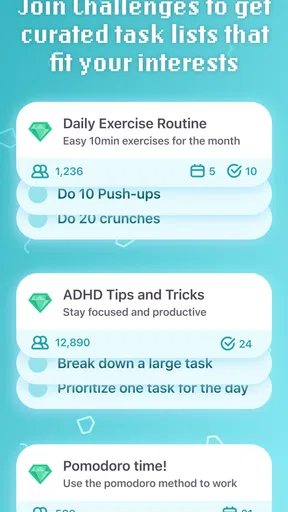
One feature I found particularly engaging is the social aspect. You can join "parties" with your friends or other users to tackle challenges together. It’s like forming a guild in an RPG, but instead of battling dragons, you’re conquering your task list. There are also "challenges" you can join for extra motivation, ranging from fitness goals to reading marathons.
The community is vibrant and supportive, which can be a huge motivator. I’ve found myself pushing a little harder to complete tasks, knowing my party is counting on me. Plus, it’s nice to share victories, no matter how small, with others who are on similar journeys.
Customization and Rewards
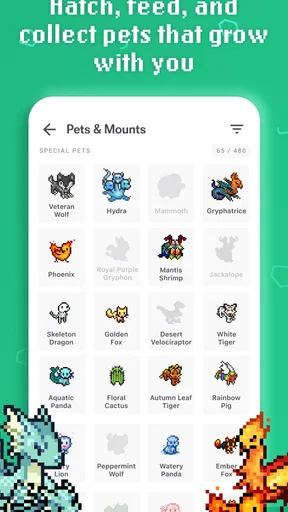
Customization is another highlight. You can tailor your avatar with different equipment and pets that you earn through your achievements. It’s a fun way to see your progress visually. Plus, who doesn’t love a cute virtual pet?
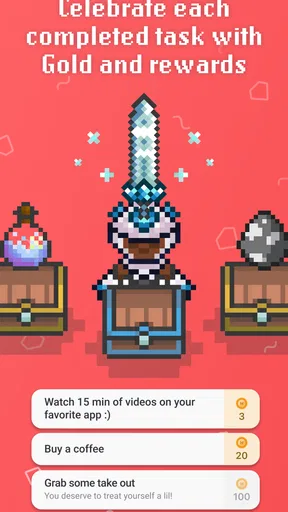
The reward system is what truly sets Habitica apart. As you complete tasks, you earn gold and experience points. Spend gold on new gear or save it for potions that heal your character. If you fail to complete your tasks, your avatar takes damage. It’s this balance of rewards and consequences that keeps the game engaging.
User Experience and Interface
The app’s interface is relatively straightforward. It might take a little time to get used to if you’re new to RPGs, but once you understand the layout, it’s smooth sailing. The design is colorful and fun, staying true to its game-like feel. However, there’s a slight learning curve with setting up tasks and understanding how everything works together.
The mobile app syncs seamlessly with the web version, which is great for those days when you prefer working from your computer. Plus, the app is free, though there are options for in-app purchases if you want to support the developers or unlock some extras.
Final Thoughts
In a world where adulting can feel monotonous, Habitica injects a bit of fun and creativity into managing your tasks. It’s not just an app; it’s a lifestyle enhancer. Whether you’re a fan of RPGs or just looking for a novel way to boost productivity, this app might just be your new sidekick.
So, if you’re ready to transform your to-do list into a series of epic quests, give Habitica a try. It could be the game-changer you didn’t know you needed. Happy questing!
Pros
- Transforms tasks into a fun game.
- Engaging community for motivation.
- Customizable avatars and rewards.
- Cross-platform sync available.
- Built-in habit tracking and reminders.
Cons
- Can be overwhelming for new users.
- Requires internet for full features.
- Limited free feature access.
- Some tasks may feel repetitive.
- In-app purchases can add up.
FAQs for Habitica: Gamify Your Tasks
What is Habitica and how does it work?
Habitica is a productivity app that turns your daily tasks and goals into a role-playing game (RPG). By completing tasks, you earn experience points (XP) and rewards, which help you level up your character. The app encourages users to build healthy habits by making the process fun and engaging.
Is Habitica free to use, or are there any in-app purchases?
Habitica offers a free version with all the basic features needed to gamify your tasks. However, there are optional in-app purchases available, such as gems, which can be used to buy cosmetic items or support the developers. A subscription service is also available, offering additional perks and customization options.
Can I use Habitica offline, or is an internet connection required?
Habitica requires an internet connection to sync your data across devices and participate in community activities. However, you can still view and manage your tasks offline, and any changes will sync once you're back online. This ensures constant access to your task list, even without connectivity.
Does Habitica support collaboration with other users?
Yes, Habitica supports collaboration through Parties and Guilds. Users can join Parties to complete challenges together and motivate each other. Guilds offer a space to connect with others who share similar interests or goals. These features enhance the sense of community and accountability among users.
How customizable is the Habitica experience?
Habitica offers a high level of customization, allowing users to personalize their avatars, task lists, and rewards. You can create custom tasks, habits, and daily goals, tailoring the app to your specific needs. Additionally, you can choose from various themes and join different challenges to keep the experience fresh and engaging.


